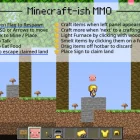
Minecraft-ish MMO
Play Minecraft-ish MMO, a multiplayer sandbox Scratch game, free in your browser. No download, no sign-up.
You may like















Minecraft-ish MMO looks like a small block-building toy, but it plays like a living shared world where every tile you place can be seen, used, or changed by someone else. Players mine, build, craft, and chat on the same map, and the space slowly fills with structures that dozens of people have touched.
| Genre | Multiplayer sandbox |
| Movement | WASD or arrow keys |
| Building | Click to mine or place, 1–9 for hotbar slots |
| Other keys | F to eat, T or C to chat, U for flight, R to respawn |
| Crafting | Stand next to a crafting table |
Mining and Building in Minecraft-ish MMO
Clicking does double duty: it mines blocks you point at and places blocks from your hotbar. The number keys 1 to 9 switch between hotbar slots, so building quickly means remembering which material sits where. New players fill the hotbar in whatever order items arrive, then waste time cycling through slots in the middle of a build.
Organize the hotbar early. Keep your main building blocks on the first few keys.
Mined materials are the raw stuff of everything else, from simple shelters to crafted items. Early in a session, most players gather the basics nearby. Once a few stacks are ready, the real building starts, and that is when the shared map begins to show its personality, with half-finished towers and tidy little houses sitting side by side.
Crafting, Food, and Staying Alive
Crafting happens at a crafting table: stand next to one and the recipes become available. Many new players wander around wondering how to craft, never realizing they need to be beside a table first. Building or finding one near your base saves endless trips.
Food matters too. Pressing F eats it, keeping your character going during long sessions.
If you get stuck or lost, R respawns you and keeps your items, which is a gentle safety net compared with many survival games. The green flag does the same job. Builders who like long projects appreciate that, since an accidental fall never wipes out an afternoon of gathering.
- Set up a crafting table near your building site.
- Keep food on the hotbar and eat with F before long trips.
- Use R to respawn with your items when you get stuck.
Land Claims, Flight, and Shared Space
Because everyone shares the same map, protecting work becomes a real concern. Land Claims mark areas where building belongs to a player, and stumbling into one can leave you stuck. Pressing U toggles flight mode, which is the standard way out when you find yourself trapped inside someone else’s claim.
Flight is also handy for building tall structures. It saves endless climbing.
Pressing Space shows who modified a tile, which is one of the most useful tools in the game. It helps track down who placed a block in your build, settle arguments about who built what, and identify players worth collaborating with. N shows player slots, so you can see who is currently in the world.
Chatting and Building Together
T or C opens chat, and talking is half of what makes the shared map work. Players coordinate big builds, trade advice, and invite others to see their creations. Collaborative projects often grow larger than anything one person could manage.
The social side has rough edges too. Not every visitor respects other people’s work.
Griefing, where someone damages another player’s build, is the most discussed problem in shared sandboxes, and this one is no exception. The tile-history tool on Space and Land Claims both exist to help, and regulars tend to build inside claims and keep an eye on who has been editing nearby. Social players who love chatting find the community the best part, while solo builders often pick a quiet corner of the map and work in peace.
- Build inside a Land Claim when working on anything you care about.
- Use Space to check who changed a tile before accusing anyone.
- Use chat to recruit help for large projects.
Minecraft-ish MMO and What It Cannot Do
The game is a two-dimensional take on block building, not a full replica of the famous sandbox it nods to. There are no deep combat systems or sprawling dimensions, and players expecting those will notice the gap quickly. What it offers instead is a shared, persistent space built entirely by its players.
Lag is the other common complaint. Busy moments can make other players and blocks update unevenly.
For most regulars, those limits matter less than the feeling of walking past a structure someone else built yesterday. That sense of a world that keeps changing between visits is the reason people return.
Minecraft-ish MMO Questions From New Builders
How do you craft in Minecraft-ish MMO?
Stand next to a crafting table and the crafting options become available. If you cannot find one, build or locate a table near your work area so you do not need to travel every time you want to craft.
What should you do if you get stuck in a Land Claim?
Press U to toggle flight mode and fly out of the claimed area. If that does not help, press R to respawn, which keeps your items so you lose nothing but your position.
How do you find out who changed your build?
Point at the tile and press Space to see who modified it. That tile history makes it much easier to deal with griefing calmly and to find the right player to talk to in chat.
The happiest builders in Minecraft-ish MMO organize their hotbar on keys 1 to 9, keep a crafting table close, protect their work with Land Claims, and use the Space tile check before blaming anyone. Fly out with U when you get stuck, respawn with R when you need to, and the shared world becomes a place you want to keep building in.
Explore More Minecraft Scratch Games
Enjoyed Minecraft-ish MMO? These picks from the same genre are a good next step:
Player Reviews
There are no reviews yet. Be the first one to write one.