
Trauma lab
Play Trauma lab, a sandbox game, free in your browser. No download, no sign-up.
You may like





















What really happens inside a body when something hits it, and how long does it take for the damage to show? Trauma Lab is built around that question, a physics and anatomy sandbox where every impact travels through layers of tissue and keeps changing the patient’s vital signs long after the first moment.
| Type | Anatomy and physics sandbox |
| Devices | Browser, Windows, Android |
| Modes | Sandbox, Keep Him Alive, two surgery settings |
| Audience | Adults only, graphic injury content |
| Status | Still in development |
How Damage Travels in Trauma Lab
Instead of a single health bar, the simulation follows each projectile through four layers in order: skin, muscle, bone and organ. A hit that grazes the forearm and a hit that reaches the chest produce completely different results, because the path matters more than the force alone.
Ragdoll physics add a layer of unpredictability. The way a body falls changes which area faces the next test, so two experiments that look identical on paper can end up very differently in practice.
People coming from simple ragdoll toys usually expect cartoon chaos. What they find instead is a model with depth, where understanding the result takes a little patience and a second look.
The X-Ray View and the Vital Signs Panel
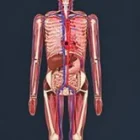
The X-ray mode is the most useful tool for beginners. It reveals bones, organs and blood vessels, turning each wound from a guess into something you can actually study. A good routine is to test once, switch to X-ray, then repeat from another angle.
The panel in the corner tracks four readings: heart rate, blood pressure, oxygen level and remaining blood volume. Watching those numbers often tells you more than watching the body itself, since a small-looking wound can keep dragging the values down while your attention is elsewhere.
Some students say the setup helps them remember anatomy lessons, but the systems are game mechanics and should never be treated as medical guidance.
Five Tool Categories in Trauma Lab
Every tool sits in one of five tabs. Hand covers direct contact, Weapons handles projectile tests, Props drops physical objects into the scene, Medicine holds treatments, and Powers lets you break realistic physics completely.
The menu can feel crowded on the first visit, so starting small helps:
- Open Sandbox and set surgery to Simple.
- Switch on X-ray before running any test.
- Use one item from Hand and one from Weapons while watching the vitals.
- Treat that same wound with something from Medicine.
- Try Props next and leave Powers for last.
Once the basics feel comfortable, combining tabs is where the sandbox becomes interesting, because every mix of tools puts a new question to the physics.
Simple or Complex Surgery
The Simple setting handles each step automatically: one tap performs the action and the procedure moves forward. It is the best way to learn the tool prompts without getting stuck on technique.
Complex surgery hands you full control. You use the scalpel, saw, clamps and sutures yourself, which slows the pace considerably and turns the operation into the main activity rather than a side step.
Neither option is timed against you. Players who enjoy experimenting tend to stay in Simple, while those who like detailed procedures switch to Complex as soon as they understand the tools.
Keep Him Alive as the Real Challenge
Sandbox has no goals, so Keep Him Alive exists for players who want a test. It presents ten emergencies in a row and limits you to the Medicine tab, forcing you to rely on treatments rather than experiments.
Success depends on reading the vital signs panel and deciding what to treat first. Most mistakes come from order: fixing a stable reading while another one collapses, or waiting too long for a value that will not recover on its own.
For players who need structure, this mode is the closest thing to a campaign, and clearing all ten emergencies is a satisfying milestone.
Where Opinions Split
The content is the first dividing line. Injuries are shown in graphic detail, a gore option exists, and the whole package is meant for adults, so anyone wanting a clinical, bloodless medical sim will likely leave early.
Structure is the second. Outside of Keep Him Alive there are no upgrades, scores or unlocks, so long sessions depend entirely on curiosity. Comments regularly request custom patients, more scenarios and even a story mode.
The developer also discloses AI assistance in parts of the code, art and audio. Players weigh that differently, and it is worth knowing before you start, even though it does not change how the simulation behaves.
- What is the difference between the two surgery settings? Simple completes each step when you tap, while Complex makes you use the scalpel, saw, clamps and sutures by hand. Most players learn the prompts in Simple before moving on.
- How do you beat Keep Him Alive? Get through ten emergencies using only the Medicine tab. Watch heart rate, blood pressure, oxygen and blood volume, and treat whichever value is dropping fastest.
- Can it teach real medicine? No. The X-ray view and vital signs panel may help you recall anatomy concepts, but every treatment is a game mechanic, not real-world advice.
Trauma Lab works best when you treat it like an actual lab: run one test, check the X-ray, read the vital signs panel, then try a fix from the Medicine tab. When open-ended experiments stop being enough, the ten emergencies of Keep Him Alive are waiting.
Explore More Sandbox Scratch Games
Enjoyed Trauma lab? These picks from the same genre are a good next step:



Player Reviews
There are no reviews yet. Be the first one to write one.